Quick Summary
- Who this guide is for: Filipino citizens, OFWs, and foreigners seeking PhilHealth membership or updates.
- Important Notes: Always prepare valid IDs and correct forms before proceeding.
- Estimated Time: 10 minutes for reading and preparation.
PhilHealth Authorization Letter: Free Sample & Generator (2026)
Quick answer
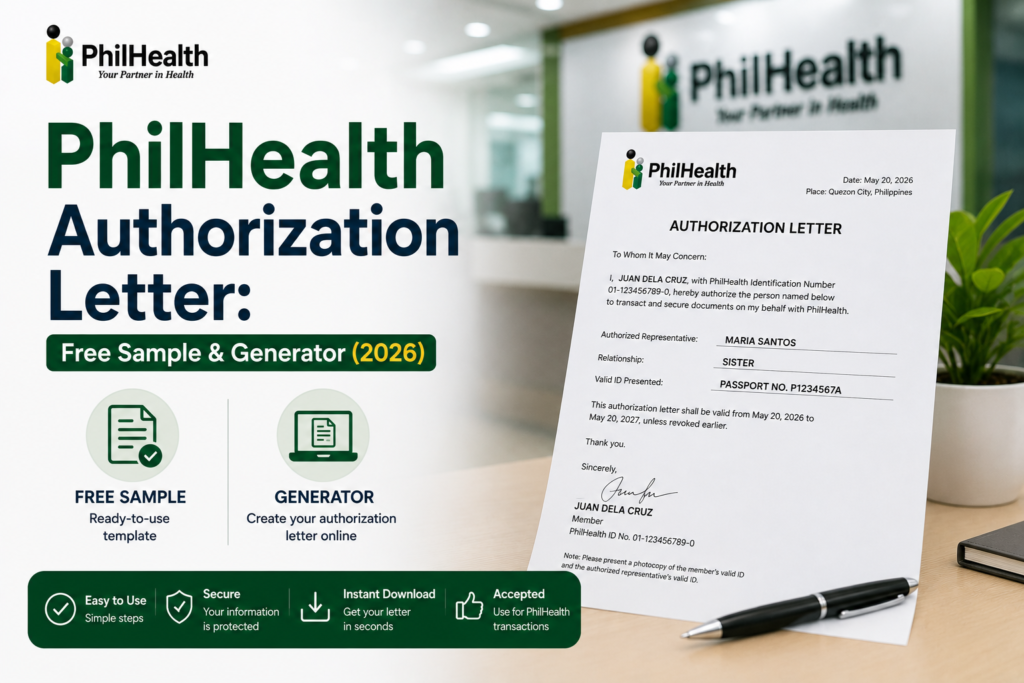
- An authorization letter lets a trusted representative transact with PhilHealth on your behalf — getting your MDR, claiming an ID, updating your records, or following up a claim.
- It does not need to be notarized. A clear, signed letter is enough at most branches.
- Your representative must bring the signed letter, a photocopy of your valid ID, and their own valid ID — original and photocopy.
- OFWs can send a scanned, emailed copy — branches are generally more lenient about wet signatures for overseas members.
- Use the generator below to build a correctly formatted letter in under a minute.
Sometimes you can’t visit a PhilHealth branch yourself — you’re hospitalized, working abroad, or simply can’t get away during office hours. A PhilHealth authorization letter is a short, formal document that gives someone else legal permission to handle a specific PhilHealth transaction for you. This guide covers exactly what to write, what your representative needs to bring, and gives you a free tool to generate one instantly.
PhilHealth ID CardApplying, replacing, and using your ID
Lost PhilHealth NumberRecover your PIN if you don’t have it on hand
PhilHealth MDRHow to get and print your Member Data Record
When do you need one?
- Getting your MDR — the most common reason representatives visit a branch.
- Applying for or replacing a PhilHealth ID on your behalf.
- Updating your information — civil status, address, or dependents.
- Submitting registration documents for a new membership.
- Following up on a claim’s status.
You can list more than one task in a single letter — just be specific about each one rather than writing a vague “for any PhilHealth transaction.”
Free authorization letter generator
Free tool Build your letter
Fill in the fields below — your letter updates automatically. Nothing you type is sent anywhere; it’s generated entirely in your browser.
This is a plain, unnotarized letter — sufficient for most PhilHealth branches. Have your representative bring a photocopy of your ID alongside the signed letter.
What your representative needs to bring
- The signed authorization letter (generated above, or handwritten)
- A photocopy of your valid government-issued ID
- Their own valid ID — original and a photocopy
- Any supporting documents specific to the transaction (e.g. PMRF for registration or updates)
⚠ Keep the purpose specific
Branches process letters faster when the purpose is explicit. Instead of "for any PhilHealth transaction," list exactly what's needed — "to obtain my MDR and apply for my replacement ID." Vague letters are the most common reason representatives get sent back for clarification.
Special notes for OFWs
If you're overseas, you can write and sign the letter, then scan it along with a copy of your passport or valid ID and email it to your representative to print. PhilHealth branches are generally more lenient with OFWs regarding wet signatures, since an original signature isn't always practical from abroad.
Frequently asked questions
Does the authorization letter need to be notarized?
No. A plain, clearly written and signed letter is sufficient at most PhilHealth branches. Notarization isn't required for standard transactions like getting an MDR or claiming an ID.
Can I authorize more than one task in the same letter?
Yes. You can list several tasks in a single letter as long as each one is stated specifically — for example, "to get my MDR and to apply for my ID," rather than a vague blanket authorization.
Does my representative need their own PhilHealth number?
No. Your representative only needs a valid ID — they don't need to be a PhilHealth member themselves to act on your behalf.
Can I send an authorization letter from abroad?
Yes. As an OFW, you can sign the letter, scan it along with a copy of your passport or valid ID, and email the scanned copies to your representative to print and bring to the branch.
What if my signature doesn't match the one on my ID?
Signatures can change over time. Attaching a photocopy of your ID that shows your current signature style, and being consistent across your documents, helps branch staff confirm your identity without delay.
Do all PhilHealth branches accept authorization letters?
Yes, any branch will accept one as long as your representative brings the required IDs and supporting documents alongside the signed letter.
Sources
- PhilHealth official website — philhealth.gov.ph
- PhilHealth Member Portal — memberinquiry.philhealth.gov.ph
Branch-level document requirements can vary slightly by region. Confirm with your local branch or the PhilHealth hotline before sending a representative on your behalf.
Need More Help?
Explore our comprehensive PhilHealth Online Registration Guide for step-by-step instructions.
View Registration Guide →