Quick Summary
- Who this guide is for: Filipino citizens, OFWs, and foreigners seeking PhilHealth membership or updates.
- Important Notes: Always prepare valid IDs and correct forms before proceeding.
- Estimated Time: 25 minutes for reading and preparation.
PhilHealth Online Registration 2026: The Most Complete, Human-Verified Guide for New Members
I remember the first time I helped my aunt, a retired teacher and now a senior citizen, figure out PhilHealth online registration. We sat at her small dining table, laptop open, convinced we’d be done in ten minutes. Two hours later, we were still deciphering which form to use. That experience taught me that even the most straightforward government portal can feel like a maze without a clear, human guide. That’s exactly why I built this resource. You’re not just registering for a number — you’re activating your access to healthcare under the Universal Health Care Act (Republic Act No. 11223). This guide walks you through every screen, every field, and every possible hiccup so you can complete your PhilHealth registration without the stress my aunt endured.
Whether you’re a fresh graduate starting your first job, a freelancer who’s been meaning to enroll for months, an OFW wanting security for family back home, or a senior citizen verifying your lifetime coverage, the PhilHealth online registration 2026 process is now fully digital. No need to line up at a PhilHealth branch if you don’t want to. In the next few minutes, I’ll share the exact steps, document requirements, and little-known fixes that I’ve gathered through years of navigating the Philippine health insurance system. Please note: procedures can change, so always verify details through the official PhilHealth website.
What is PhilHealth Online Registration?
PhilHealth online registration is the official digital pathway to enroll in the Philippine Health Insurance Corporation, a government-owned and controlled corporation. It allows every Filipino to obtain a unique PhilHealth Identification Number (PIN) and become a member without visiting a physical office. This system was strengthened under the Universal Health Care Act, which mandates automatic inclusion of all Filipinos in the National Health Insurance Program.
When you complete your PhilHealth online registration, you are essentially creating your permanent record within the corporation’s database. This record generates your Member Data Record (MDR), a crucial document for hospital admissions, benefit claims, and employment requirements. The process involves filling out the PhilHealth Member Registration Form (PMRF) and submitting supporting documents electronically. In 2026, the online portal handles everything from new member sign-up to account activation and contribution tracking.
Think of it as your digital health insurance identity card. Once your PhilHealth account is active, you can log in to the PhilHealth Member Portal anytime to check your contributions, update dependents, or download your MDR. The entire ecosystem is designed to make healthcare financing transparent and accessible, aligning with the Philippine Government’s push for digitalization.
Who Can Register for PhilHealth Online?
The short answer: virtually every Filipino. The Universal Health Care Act classifies members into two main groups — Direct Contributors and Indirect Contributors. Your category determines how you pay premiums, but everyone starts with the same PhilHealth online registration form.
- Employees in the public and private sector.
- Self-employed individuals, including freelancers, gig workers, and small business owners.
- Overseas Filipino Workers (OFWs).
- Voluntary members — those not formally employed but willing to pay premiums.
- Senior Citizens who are automatically covered but may need to update their profiles.
- Students transitioning from dependent status to voluntary membership.
- Indirect contributors like indigents, persons with disabilities (PWDs), and 4Ps beneficiaries (often registered through sponsored programs but may still need to activate an online account).
If you’ve never had a PIN before, you fall under PhilHealth new member registration. The online portal is built to handle first-time applications smoothly.
Benefits of Registering Online Instead of Walking In
I’ve personally queued at a PhilHealth branch at 6 AM only to get a number that was called at 2 PM. Online registration eliminates that entirely. Beyond saving time, here’s what you gain:
- Instant PIN generation for most straightforward applications.
- Immediate access to the PhilHealth Member Portal upon activation.
- 24/7 ability to download your Member Data Record — no need to request it in person.
- Secure storage of your documents in the PhilHealth database.
- Easy updating of dependents and contact information.
- Online contribution payment and viewing of premium history.
The portal registration also supports the government’s paperless initiative, making your PhilHealth membership management greener and more efficient.
Eligibility Requirements and Membership Categories
Under Republic Act No. 11223, every Filipino citizen is eligible for PhilHealth coverage. Your specific membership category as a Direct Contributor determines how much you pay. Here’s a breakdown:
- Formal Economy Employees: Your employer shares the contribution with you. They usually handle the PhilHealth registration form submission, but you might still need to do online activation.
- Self-Earning Individuals: Freelancers, sole proprietors, and informal sector workers. You pay the full premium yourself based on declared income.
- OFWs: You pay an annual or semi-annual contribution. Registration is mandatory, and online is the most convenient route while abroad.
- Voluntary Members: Includes those who separated from employment but want to continue coverage, or homemakers not otherwise categorized.
- Senior Citizens: Automatically covered under the law; no premium payment required if not actively employed. You only need to ensure your MDR reflects your senior status.
- Lifetime Members: Those who have reached retirement age and paid at least 120 monthly contributions.
PhilHealth Requirements: Documents You Must Prepare
Before clicking any button, gather your PhilHealth requirements. Missing a clear ID scan is the number one reason registrations stall. Based on years of troubleshooting for clients, here’s the definitive checklist:
For Employees
- Duly accomplished PhilHealth PMRF (you can download this from the official website).
- One valid government-issued ID (UMID, passport, driver’s license, national ID).
- Your employment contract or certificate of employment (sometimes required if the employer hasn’t pre-registered you).
For Self-Employed / Freelancers
- Completed PMRF indicating self-employed/voluntary category.
- Valid ID.
- Proof of income (business permit, DTI registration, certificate of engagement, or latest income tax return).
For OFWs
- PMRF with OFW membership type selected.
- Passport (bio page).
- Overseas Employment Certificate or valid work contract.
- Any other valid ID.
For Senior Citizens
- Senior Citizen ID or OSCA ID.
- Valid government ID.
- PMRF for update, if registering online for the first time.
Always scan or photograph your documents clearly. Blurry images are rejected, delaying your PhilHealth online registration 2026 process.
PhilHealth Online Registration Process: The Exact Steps
Let’s walk through the actual screens. I’ll describe each field you’ll encounter so you won’t get stuck.
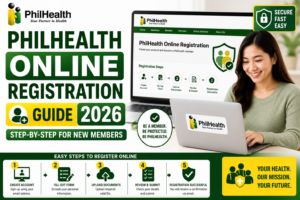
Step 1: Access the Official Website
Open your browser and go to the official PhilHealth website. Verify that the URL starts with https:// and shows a lock icon. Look for the “Online Services” or “Member Portal” link prominently displayed on the homepage. Never use third-party sites that claim to register you.
Step 2: Navigate to Registration
On the PhilHealth portal, select “Register” or “New Member Registration”. This will redirect you to the PhilHealth portal registration page. You’ll see an option for “Individual” membership. Click that.
Step 3: Read and Accept the Terms
You’ll be presented with a data privacy notice and terms of service. Read through and click “I Accept”. The site emphasizes the security measures under the Data Privacy Act.
Step 4: Fill Out the PMRF Digitally
This is the most critical part. The online form mirrors the PhilHealth registration form (PMRF). You need to provide:
- Complete name (as it appears on your ID).
- Date of birth, place of birth, gender, civil status.
- Contact information (active email address and mobile number).
- Membership type (Employee, Self-employed, OFW, Voluntary).
- If employed, your employer’s PhilHealth number or name (if known).
- Dependent information (spouse, children under 21, parents over 60 who depend on you).
Take your time. Mistakes here mean a delayed PhilHealth membership activation.
Step 5: Upload Supporting Documents
Attach the required clear scanned copies. The portal accepts PDF, JPG, or PNG formats. Ensure each file is under the size limit indicated (usually 2MB).
Step 6: Review and Submit
Double-check every field. A single typo in your name can prevent future PhilHealth login attempts. Click “Submit”.
Step 7: Note Your Transaction Number
The screen will display a transaction number. Write it down or screenshot it. You’ll also receive an acknowledgment email. This is your proof of PhilHealth online registration while the application is processed.
How to Create Your PhilHealth Member Portal Account
Some registrations automatically create your portal access; others require a separate step. If after receiving your PIN you cannot log in, here’s what to do:
- Go to the PhilHealth Member Portal .
- Click “Create Account” or “Register”.
- Enter your newly issued PhilHealth Identification Number.
- Provide your full last name and date of birth exactly as registered.
- Create a strong password.
You’ll immediately receive an account activation link via email.
PhilHealth Account Activation and Email Verification
Check the inbox of the email you used during registration. If you don’t see the verification message within five minutes, check the spam or promotions folder. This happens often with Gmail accounts. Click the verification link to complete your PhilHealth account activation. If the link expires, simply click “Resend” on the portal login page. Once verified, your PhilHealth online account is fully functional.
How to Download Your Member Data Record (MDR) Online
The Member Data Record is proof of your active membership. After logging in to the portal:
- Hover over the “Membership” or “My Profile” menu.
- Click “View Member Data Record”.
- Your latest PhilHealth MDR will appear as a PDF.
- Download and save it. You can print this for hospital admissions or employment requirements.
If you see “No Record Found”, it could mean your account isn’t synced yet. Wait 24 hours, or ensure you haven’t accidentally created a duplicate profile.
How to Retrieve Your PhilHealth Identification Number
Losing your PIN is common. To retrieve it online, use the “Forgot PIN” link on the portal login page. Input your full name and birth date. If the record matches, your PhilHealth Identification Number will be displayed on screen or sent via email. If that fails, you might have multiple records. In that case, calling the hotline or visiting a branch with a valid ID becomes necessary.
PhilHealth Contribution Information 2026
Under the Universal Health Care Act, the premium contribution schedule is set by the PhilHealth board and the President. For 2026, the rate for direct contributors remains calculated against a defined income ceiling. Because I want you to have exact figures, please refer to the latest PhilHealth Contribution table on our resource page.
As a quick guide: Employed members share the premium with their employer. Self-employed individuals calculate their PhilHealth contribution based on declared monthly earnings. OFWs pay a fixed annual rate. Timely payment ensures uninterrupted PhilHealth benefits. You can pay online via the portal, GCash, Maya, or partner banks.
Common PhilHealth Online Registration Problems and How I Solve Them
Over the years, I’ve seen the same issues repeat. Here’s how to fix them fast.
“Email Already Exists” Error
You might have previously registered an account and forgotten. Use the “Forgot Password” link. If you’re certain you never registered, someone may have mistyped their own email. Contact PhilHealth support to correct the record.
ID Upload Failure
Reduce the file size. Use a JPEG under 1MB. Rename the file without special characters (use “passport_juan.jpg”, not “passport#@!.jpg”).
Portal Loading Blank Page
Try during off-peak hours, usually late evening or early morning. Also, clear your browser cache or use incognito mode.
Duplicate PIN Issued
If you registered years ago and forgot, then registered again, you now have two records. This is serious and requires merging at a PhilHealth branch. The online system cannot fix duplicates automatically.
Common Errors During Registration You Should Avoid
- Name mismatch: Your ID says “Ma. Teresa” but you typed “Maria Teresa”. Use exactly what’s on your government ID.
- Wrong membership type: A freelancer selecting “Employee” will cause contribution discrepancies later.
- Dependent declaration issues: Only list legitimate dependents. They will be verified. A spouse cannot be a dependent under PhilHealth rules.
My Top 5 Tips Before You Start PhilHealth Online Registration
- Use a laptop or desktop for the initial registration — the PMRF is long and mobile screens can cut off fields.
- Have all scanned IDs ready on your device beforehand.
- Use a personal email you will always have access to, not a company email you might lose.
- Write down your intended password somewhere safe immediately, as the portal may log you out.
- Do not refresh the page while uploading files; it almost always fails.
Safety Tips for Your PhilHealth Online Services
Scammers often create fake PhilHealth portals to collect personal data. Always check you are on the official Philippine Government domain. Never entertain text messages offering “fast-tracked” PhilHealth registration for a fee. Registration is free of charge (except for the actual contribution premium). Your PhilHealth login credentials should never be shared with anyone, including people claiming to be agents.
PhilHealth Online Registration for Different Member Types
PhilHealth Online Registration for Employees
Most employers handle the bulk PhilHealth registration form submission. If your HR department says you’re registered but you don’t have your PIN, ask for it directly. Then, proceed to the PhilHealth Member Portal to activate your PhilHealth online account and download your MDR. Your contribution is automatically deducted from your salary.
PhilHealth Online Registration for Self-Employed / Freelancers
You are entirely responsible for your PhilHealth membership. Select “Self-Earning Individual” on the PMRF. Declare a reasonable monthly income — this determines your premium bracket. After registration, pay your PhilHealth contribution quarterly or annually through online banking to avoid penalties. Many freelancers forget that continuous payment guarantees eligibility for sickness and maternity benefits.
PhilHealth Online Registration for OFWs
As an OFW, you are required to pay the premium. Registering online from your host country saves immense hassle. Use your Philippine passport and contract. Once your PIN is issued, you can pay through Bayad Center partners, online remittance apps, or the portal directly. Your dependents in the Philippines remain covered as long as your contributions are current.
PhilHealth Online Registration for Senior Citizens
Under the law, senior citizens not covered by any existing membership category become automatic lifetime members. If you’ve never had a PhilHealth card, you can still use the online portal to update your profile and secure your PhilHealth ID / MDR. Hospitals need your PIN to process automatic PhilHealth deductions from your hospital bill.
PhilHealth Online Registration for Students
Students aged 21 and above are typically no longer dependents. If you don’t have a job yet, you can register as a voluntary member. The premium is minimal, but it starts your contribution history. Having an active PhilHealth account as a young adult ensures coverage in emergencies without scrambling for documents.
Frequently Asked Questions About PhilHealth Online Registration
Can I register my newborn baby for PhilHealth online?
Newborns are covered as dependents of their PhilHealth-registered parents. To add a newborn, log in to the Member Portal, select “Update Dependents”, and upload the child’s birth certificate. A new PIN is not issued for dependents under 21; they are covered by the principal member’s contributions.
How long does PhilHealth online registration take to process?
If all documents are clear and the system experiences no issues, your PIN can be generated instantly or within 24 hours. Sometimes, manual verification takes up to 3 working days. Always check your email for the confirmation message containing your transaction status.
What if I change my surname after marriage?
Update your membership records immediately. Use the “Member Update” function in the portal. Upload your marriage certificate and a new ID reflecting your married name. The PhilHealth MDR must match your valid identification, or hospitals may deny benefit claims.
Is the PhilHealth ID card still issued?
PhilHealth has largely shifted to the digital Member Data Record. While physical PhilHealth ID cards were issued in the past, the MDR printout now serves as the primary proof of membership, along with a government-issued ID. You can simply present the downloaded PDF on your phone.
How do I update my contact number in the PhilHealth portal?
After logging in, go to “Profile Settings” and update your mobile number. You’ll need to verify the new number via an OTP. An active mobile number is critical for receiving PIN retrieval codes and contribution payment confirmations.
Can I use the PhilHealth online registration if I have no existing email?
An active email address is mandatory for the online system. If you don’t have one, create a free Gmail or Yahoo account first. The email is used for verification, password recovery, and official communications from PhilHealth.
What is the difference between the PMRF and the MDR?
The PMRF (PhilHealth Member Registration Form) is the application form you submit to enroll. The MDR (Member Data Record) is the official document generated after successful registration, summarizing your membership details, contribution history, and listed dependents.
Are kasambahays (domestic workers) required to register online?
Yes, domestic workers are covered under the Kasambahay Law and must be registered by their employers. If you are a kasambahay, your employer should facilitate the PhilHealth registration. Ensure they provide you with your PIN so you can monitor your contributions.
I am unemployed right now. Can I still have PhilHealth?
Absolutely. You can register as a voluntary member. This ensures your healthcare coverage continues even between jobs. You’ll need to pay the full premium yourself, based on the voluntary rate, to keep your membership active.
Where can I see my PhilHealth contribution payment history?
Log in to the Member Portal and navigate to the “Contributions” or “Payment History” section. All payments made online or via accredited partners will be reflected. If a payment is missing, upload the receipt through the dispute form.
Summary: Your Health Insurance, Digitally Secured
Completing your PhilHealth online registration is one of the most empowering steps you can take as a Filipino citizen. It transforms a bureaucratic chore into a portable, digital safety net. From the initial PhilHealth registration form to finally holding your Member Data Record in your hands (or on your screen), the process is designed to give you control over your health finances.
We covered the exact flow — eligibility, documents, the step-by-step portal walkthrough, and how to fix errors. Remember, your PhilHealth PIN is as valuable as any other government ID number. Treat it with care, keep your contributions updated, and always use the official portal for updates.
If you found this guide helpful, explore our other resources on PhilHealth Benefits and PhilHealth Requirements to maximize your membership.
A Final Word from My Aunt’s Kitchen Table
When my aunt finally downloaded her MDR that afternoon, she looked at the screen and said, “So I’m really insured now, just like that?” Yes, she was. The digital transformation of the Philippine Government services means your access to the National Health Insurance Program is literally at your fingertips. Don’t wait for an emergency to verify your coverage. Take fifteen minutes, register online, and secure your peace of mind today.
Ready to begin? Head to the official PhilHealth Member Portal now. Just ensure you’ve prepared your ID and a valid email address. Still have questions? Drop a comment below or browse our detailed guides on PhilHealth Member Portal features.
Image Recommendations for This Article
- Filename: philhealth-homepage-dashboard-2026.jpg
ALT: Official PhilHealth website homepage showing the member portal login button.
Title: PhilHealth Official Website Dashboard
Caption: The main dashboard of the official PhilHealth website where users can access online registration. - Filename: sample-pmrf-form-filled.jpg
ALT: Sample PhilHealth Member Registration Form with fields filled out correctly.
Title: Completed PhilHealth PMRF Form
Caption: A guide to filling out the PhilHealth PMRF for new member registration. - Filename: valid-ids-philhealth-registration.jpg
ALT: Valid government IDs accepted for PhilHealth online registration like passport, UMID, and driver’s license.
Title: Accepted PhilHealth Registration IDs
Caption: Examples of valid identification documents required for PhilHealth registration. - Filename: philhealth-portal-registration-screen.jpg
ALT: Screenshot of the PhilHealth online registration page with fields for name and email.
Title: PhilHealth Online Registration Interface
Caption: The online interface where new members input their personal information for PhilHealth enrollment. - Filename: member-data-record-mdr-sample.jpg
ALT: Sample PhilHealth Member Data Record document showing membership details and contribution history.
Title: PhilHealth MDR Sample Document
Caption: A sample of the digital Member Data Record that members can download from the portal. - Filename: philhealth-email-verification-message.jpg
ALT: Screenshot of the PhilHealth account activation email in a Gmail inbox.
Title: PhilHealth Account Activation Email
Caption: The email verification message sent by PhilHealth to activate your online member portal account. - Filename: uploading-documents-philhealth-portal.jpg
ALT: User attaching a scanned valid ID to the PhilHealth online registration form.
Title: Uploading PhilHealth Requirements Online
Caption: Step showing how to upload required documents during the PhilHealth online registration process. - Filename: philhealth-contribution-table-2026.jpg
ALT: Updated PhilHealth contribution rate table for direct contributors in 2026.
Title: PhilHealth Contribution Table 2026
Caption: The official contribution schedule for employed, self-employed, and voluntary members for the year 2026. - Filename: ofw-registering-philhealth-online.jpg
ALT: OFW holding passport while completing PhilHealth online registration on a laptop.
Title: OFW PhilHealth Online Registration
Caption: An overseas Filipino worker completing the mandatory PhilHealth registration from abroad. - Filename: successful-philhealth-registration-confirmation.jpg
ALT: Success message on the PhilHealth portal confirming new member registration and displaying PIN.
Title: PhilHealth Registration Success Screen
Caption: The confirmation screen showing a successful PhilHealth online registration and the new PIN.
Key Takeaways
- PhilHealth online registration is the digital gateway to the National Health Insurance Program under the Universal Health Care Act.
- You need a valid ID, a working email, and the completed PMRF to start your PhilHealth new member registration.
- The PhilHealth Member Portal provides instant access to your MDR and contribution history.
- Accuracy in your name and details is critical — mismatches will delay your PhilHealth account activation.
- Always verify information through the official PhilHealth website, as policies and contribution tables can change yearly.
Need More Help?
Explore our comprehensive PhilHealth Online Registration Guide for step-by-step instructions.
View Registration Guide →