Quick Summary
- Who this guide is for: Filipino citizens, OFWs, and foreigners seeking PhilHealth membership or updates.
- Important Notes: Always prepare valid IDs and correct forms before proceeding.
- Estimated Time: 20 minutes for reading and preparation.
PhilHealth ID Guide 2026: How to Apply, Replace & Use Your Identification Card
What Is a PhilHealth ID?
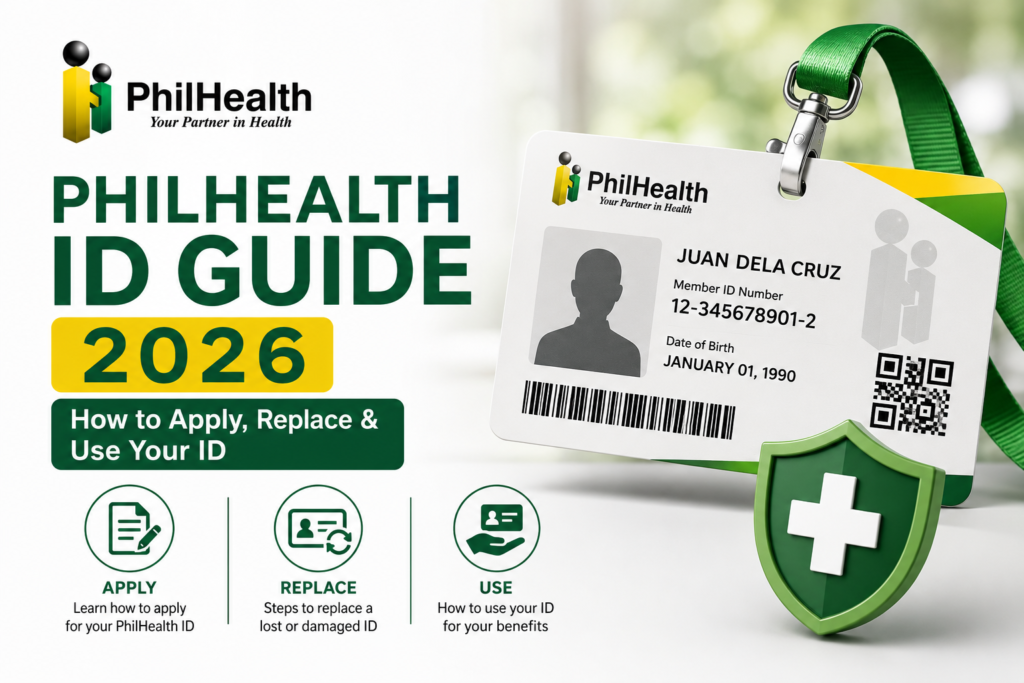
A PhilHealth ID is an official identification card issued by the Philippine Health Insurance Corporation to its registered members. It displays your full name, your unique 12-digit PhilHealth Identification Number (PIN), your photograph, and your membership category. The card serves dual purposes: it is both proof of your PhilHealth membership and a government-issued identification document accepted by various agencies and institutions. When you visit a hospital, clinic, or PhilHealth branch, presenting your PhilHealth ID allows staff to quickly verify your identity and access your membership records. It is one of the most practical IDs to carry — lightweight, official, and directly linked to your health insurance coverage.
Why a PhilHealth ID Is Important
- Hospital admissions: Presenting your PhilHealth ID speeds up verification of your membership and eligibility for benefits.
- Government transactions: The PhilHealth ID is recognized as a valid government-issued ID by many offices.
- Employment requirements: Many employers request a copy of your PhilHealth ID during onboarding.
- PhilHealth branch visits: Having your ID ready makes any in-person transaction faster and smoother.
- Identity verification: It serves as an additional layer of identification alongside your other government IDs.
Types of PhilHealth IDs
| ID Type | Description | Availability |
|---|---|---|
| Regular PhilHealth Identification Card | Standard paper-based card with member photo, name, and PIN | Issued at PhilHealth branches |
| PVC Health Insurance Card | Durable plastic card; may involve additional requirements or fees | Availability varies; inquire at branch |
| Digital Membership Record (MDR) | Printable PDF document serving as proof of membership | Downloadable 24/7 via Member Portal |
Regular PhilHealth ID vs PVC Health Insurance Card
| Feature | Regular PhilHealth ID | PVC Health Insurance Card |
|---|---|---|
| Material | Paper-based card | Durable plastic (PVC) |
| Cost | Usually free | May involve a processing fee |
| Availability | Widely available at branches | Limited availability; inquire locally |
Digital and Printable PhilHealth Membership Records
Beyond physical cards, PhilHealth members can access a digital version of their membership proof through the Member Portal. The Member Data Record (MDR) is a downloadable PDF that displays your name, PIN, membership type, dependents, and contribution summary. Many hospitals now accept a printed MDR or even a digital copy on your phone as sufficient proof of PhilHealth membership for admissions and benefit claims. This digital option is especially useful if you have not yet received your physical ID card or if you need immediate proof of coverage. For more on the MDR, see our PhilHealth MDR guide.
Who Is Eligible for a PhilHealth ID?
- All registered PhilHealth members with an active PhilHealth PIN.
- Newly registered members who have just received their PIN.
- Members of all categories — employed, self-employed, voluntary, OFW, sponsored, and senior citizens.
- Members seeking replacement of a lost, damaged, or outdated ID.
You must have a PhilHealth PIN before applying for an ID. If you have not yet registered, complete your PhilHealth online registration or visit a PhilHealth branch to get your PIN first.
PhilHealth ID Requirements
- PhilHealth Identification Number (PIN) — you must already be registered.
- One valid government-issued ID — for identity verification.
- Completed PhilHealth Member Registration Form — if you are a new applicant without existing records.
- Personal appearance — photo and biometrics are typically captured at the branch.
Documents Required for PhilHealth ID Application
| Document | New Application | Replacement |
|---|---|---|
| PhilHealth PIN | Required | Required |
| Valid Government ID | Required | Required |
| Completed PMRF | Required for new members | Not required |
| Affidavit of Loss | Not required | Required for lost ID replacement |
Accepted Valid IDs for PhilHealth ID Application
- Philippine National ID (PhilSys)
- Unified Multi-Purpose ID (UMID)
- Philippine Passport
- Driver’s License
- PRC ID
- SSS ID or GSIS eCard
- Senior Citizen ID
- OWWA ID (for OFWs)
- Voter’s ID or Voter’s Certification
The ID must be current, not expired, and display your full name and photograph. For a complete list of accepted IDs, see our PhilHealth requirements guide.
Quick PhilHealth ID Application Checklist
- ☐ PhilHealth PIN ready
- ☐ Valid government ID (original and photocopy)
- ☐ Completed PMRF (for new members)
- ☐ Affidavit of loss (for replacement of lost ID)
- ☐ Personal appearance at PhilHealth branch
How to Apply for a PhilHealth ID
Step 1: Prepare Your Documents
Gather your PhilHealth PIN, one valid government ID, and a completed PMRF if you are a new member. Bring the original and a photocopy of your ID.
Step 2: Visit a PhilHealth Branch
Go to the nearest PhilHealth branch. Inform the officer that you want to apply for a PhilHealth ID. The officer will verify your membership records.
Step 3: Submit Documents and Capture Biometrics
Submit your requirements. Your photograph, fingerprint, or other biometrics may be captured at the branch for the ID card.
Step 4: Receive Your PhilHealth ID
Some branches issue the regular PhilHealth ID on the same day. Others may provide a claim stub with a pickup date. The PVC Health Insurance Card, if available, may have a different processing timeline.
How to Get a PhilHealth ID Online
Currently, the physical PhilHealth ID card typically requires a personal appearance at a PhilHealth branch for photo and biometric capture. However, your digital membership proof — the Member Data Record (MDR) — is available entirely online. Log into the Member Portal, navigate to the MDR section, and download your record as a PDF. This document serves as official proof of PhilHealth membership and is accepted by many hospitals and employers. For the physical card, check if PhilHealth has introduced any online appointment or application system by visiting the official website. As digital government services evolve, online ID application options may become available.
How to Apply for a PhilHealth ID at a Branch
Branch application is the standard method for obtaining a physical PhilHealth ID. Visit any PhilHealth branch during operating hours. No appointment is typically needed for the regular ID, though some branches may have specific schedules. Bring your complete documents. The entire process — from document verification to photo capture — usually takes less than an hour, not including waiting time. The regular PhilHealth Identification Card is often issued on the same day. If you are interested in the PVC Health Insurance Card, ask the branch officer about availability and any additional requirements.
How to Replace a Lost or Damaged PhilHealth ID
Step 1: Secure an Affidavit of Loss
If your ID was lost, obtain a notarized affidavit of loss explaining the circumstances. If your ID is damaged but you still have it, bring the damaged card instead.
Step 2: Visit a PhilHealth Branch
Go to a PhilHealth branch with your affidavit of loss (for lost IDs), a valid government ID, and your PhilHealth PIN.
Step 3: Complete the Replacement Form
Fill out the PhilHealth ID replacement form provided by the branch officer. Your photo and biometrics will be recaptured.
Step 4: Receive Your Replacement ID
The replacement ID is processed. Some branches may charge a replacement fee. Processing may take longer than a new application.
How to Update Information Before Requesting a New PhilHealth ID
If your personal information — name, civil status, or address — has changed since your last ID was issued, update your records before applying for a new ID. Log into the Member Portal for minor updates, or visit a PhilHealth branch with supporting legal documents (marriage certificate, annotated birth certificate, or court decree) for major changes. Requesting an ID with outdated information will result in a card that does not match your current identification documents, causing problems during verification.
How to Correct Errors on a PhilHealth ID
If your issued PhilHealth ID contains an error — misspelled name, wrong birthdate, incorrect membership category — visit a PhilHealth branch immediately. Bring the erroneous ID, a valid ID showing the correct information, and supporting documents proving the correct details. PhilHealth will verify the error and process a corrected ID. Do not continue using an ID with incorrect information — this can cause claim denials and verification issues.
PhilHealth ID Processing Considerations
Processing times for PhilHealth IDs vary by branch and ID type. The regular identification card is often issued on the same day as application. The PVC Health Insurance Card, if available, may take longer. Replacement IDs may require additional processing time. Branch workload, system availability, and supply of card materials can all affect timelines. Contact your servicing branch for their current processing estimates.
Does the PhilHealth ID Expire?
The PhilHealth ID does not have a printed expiration date. However, if your physical appearance changes significantly or your card becomes worn and unreadable, you may want to request a replacement. More importantly, your membership status can change — if your contributions lapse and your membership becomes inactive, the ID card remains physically valid as identification but your eligibility for PhilHealth benefits is suspended. Always maintain active membership status through regular contributions. For contribution guidance, see our voluntary contribution guide.
Can the PhilHealth ID Be Used as a Valid Government ID?
Yes, the PhilHealth ID is recognized as a valid government-issued identification card and is accepted by many government agencies, banks, and private institutions for identity verification. However, acceptance is not universal — some institutions may require a primary ID such as the Philippine National ID, passport, or UMID. The PhilHealth ID is most reliably used for PhilHealth-related transactions: hospital admissions, benefit claims, and PhilHealth branch visits. It is always a good practice to carry multiple valid IDs to cover different institutional requirements.
Difference Between PhilHealth ID, MDR, PMRF, and PhilHealth Number
| Item | What It Is | Primary Use |
|---|---|---|
| PhilHealth Number (PIN) | 12-digit unique identifier | Account access, contribution tracking |
| PhilHealth ID | Physical card with photo, name, PIN | Identification, hospital admissions |
| MDR | Document summarizing membership | Proof of active membership, dependents |
| PMRF | Registration form | New member enrollment |
How Employers Help with PhilHealth Registration
For employed members, the employer’s HR department typically handles initial PhilHealth registration and enrollment. Some employers facilitate bulk ID applications for their workforce. If your employer processes your registration, they should provide you with your PhilHealth PIN. You can then apply for your physical ID card at a PhilHealth branch using that PIN. For more on employer responsibilities, see our PhilHealth Employers guide.
Common PhilHealth ID Application Mistakes
- Applying without a PhilHealth PIN — you must be registered first. Complete your online registration or visit a branch.
- Bringing an expired ID — your verifying ID must be current and valid.
- Name mismatches — the name on your documents must match your PhilHealth records exactly.
- Not updating personal information first — if you recently married or changed your name, update records before applying for an ID.
Safety Tips to Avoid Fake PhilHealth ID Services
- Only transact at official PhilHealth branches — never pay third parties claiming they can expedite ID issuance.
- PhilHealth ID application is free for the regular card. Be wary of anyone charging fees outside official replacement or PVC card charges.
- Do not share your PhilHealth PIN with unauthorized individuals.
- Verify any online service claiming to offer PhilHealth ID applications — only the official PhilHealth website is authorized.
Expert Tips for Managing Your PhilHealth ID
- Keep a photo of your PhilHealth ID on your phone as a backup.
- Download your MDR from the Member Portal as a secondary proof of membership.
- Store your PhilHealth ID in a protective sleeve to prevent wear and fading.
- If you lose your ID, report it promptly and secure an affidavit of loss to prevent misuse.
PhilHealth ID Reference Comparison Tables
New Application vs Replacement
| Feature | New Application | Replacement |
|---|---|---|
| PMRF Required | Yes (for new members) | No |
| Affidavit of Loss | Not required | Required for lost IDs |
| Fee | Usually free | May involve a replacement fee |
Common Problems and Solutions
| Problem | Solution |
|---|---|
| Lost PhilHealth ID | Secure affidavit of loss; apply for replacement at branch |
| Name misspelled on ID | Visit branch with correct ID and supporting documents for correction |
| Damaged or faded ID | Bring damaged card to branch for replacement |
Frequently Asked Questions About the PhilHealth ID
How long does it take to get a PhilHealth ID?
The regular PhilHealth Identification Card is often issued on the same day as application at the branch. The PVC Health Insurance Card, if available, may take longer. Replacement IDs may require additional processing time. Check with your servicing branch for current estimates.
Is the PhilHealth ID free?
The regular PhilHealth Identification Card is typically issued free of charge to members. The optional PVC Health Insurance Card may involve a processing fee. Replacement of lost IDs may also incur a fee. Always verify current fee policies at your PhilHealth branch.
Can I use my MDR instead of a PhilHealth ID at the hospital?
Yes. Many hospitals accept the Member Data Record (MDR) — either printed or digital on your phone — as sufficient proof of PhilHealth membership for admissions and benefit claims. Download your MDR from the Member Portal. Having both your ID and MDR is ideal.
Can I apply for a PhilHealth ID if I lost my PIN?
You need your PhilHealth PIN to apply for an ID. If you lost your PIN, recover it first through the Member Portal “Forgot PIN” feature or by visiting a PhilHealth branch with a valid ID. For detailed recovery steps, see our lost PhilHealth number guide.
Can OFWs apply for a PhilHealth ID while abroad?
The physical PhilHealth ID card requires personal appearance at a PhilHealth branch for photo and biometric capture. OFWs can apply during their visits to the Philippines. In the meantime, OFWs can download their MDR from the Member Portal as digital proof of membership accessible from anywhere.
Key Takeaways
- The PhilHealth ID is an official government-issued identification card displaying your name, photo, and PhilHealth PIN.
- You must have a PhilHealth PIN before applying for an ID. New members should complete registration first.
- The Member Data Record (MDR) serves as a digital alternative for proof of membership when a physical ID is not available.
- Lost IDs require a notarized affidavit of loss and in-person branch visit for replacement.
- ID issuance procedures and requirements may change. Always verify through the official PhilHealth website at www.philhealth.gov.ph.
Image Recommendations for This Article
- Filename: philhealth-id-regular-card-sample.jpg
ALT: Sample of the regular PhilHealth Identification Card showing member name, photo, and PIN.
Title: PhilHealth ID Sample
Caption: The regular PhilHealth Identification Card is issued at PhilHealth branches. - Filename: philhealth-id-application-branch-process.jpg
ALT: Member applying for a PhilHealth ID at a branch with photo and biometric capture.
Title: Applying for PhilHealth ID
Caption: Visit a PhilHealth branch with your PIN and valid ID to apply for your identification card. - Filename: philhealth-id-vs-mdr-comparison.jpg
ALT: Side-by-side comparison of the physical PhilHealth ID card and the downloadable Member Data Record.
Title: PhilHealth ID vs MDR
Caption: The physical ID and the digital MDR both serve as proof of PhilHealth membership.
Disclaimer
philhealth-portal.ph is an independent informational website and is not affiliated with the Philippine Health Insurance Corporation (PhilHealth) or the Philippine Government. PhilHealth ID issuance procedures, eligibility requirements, and membership policies may change over time. Always verify important information through official PhilHealth resources at www.philhealth.gov.ph.
Need More Help?
Explore our comprehensive PhilHealth Online Registration Guide for step-by-step instructions.
View Registration Guide →