Quick Summary
- Who this guide is for: Filipino citizens, OFWs, and foreigners seeking PhilHealth membership or updates.
- Important Notes: Always prepare valid IDs and correct forms before proceeding.
- Estimated Time: 18 minutes for reading and preparation.
PhilHealth Contribution Payment Guide 2026: Complete Online, GCash, Banks & More
What Is a PhilHealth Contribution Payment?
A PhilHealth contribution payment is the premium amount you remit to the Philippine Health Insurance Corporation to maintain your active membership in the National Health Insurance Program. These payments fund the pool of resources that PhilHealth uses to pay for members’ hospital bills, outpatient services, catastrophic illness coverage, and primary care benefits. Your contributions are not just an expense — they are your financial stake in a nationwide health safety net. Under Republic Act No. 11223, the Universal Health Care Act, all Direct Contributors are required to pay premiums based on their income. The payment methods available have expanded significantly, giving members flexibility in how and when they pay.
Why Paying PhilHealth Contributions on Time Is Critical
- Benefit eligibility: You need at least three months of contributions within the six months before any hospital confinement or medical procedure.
- Active membership status: Lapsed payments result in inactive status, blocking all PhilHealth benefits for you and your dependents.
- Continuous coverage: Regular payments ensure you never face a gap in protection during medical emergencies.
- Legal compliance: Under the Universal Health Care Act, maintaining contributions is a legal obligation for Direct Contributors.
Who Needs to Pay PhilHealth Contributions?
| Member Category | Who Pays | Payment Frequency |
|---|---|---|
| Employed (Private & Government) | Employer remits employee + employer share | Monthly |
| Self-Employed | Member pays 100% | Quarterly, semi-annual, or annual |
| Voluntary | Member pays 100% | Quarterly, semi-annual, or annual |
| OFW | Member pays 100% | Annual |
| Sponsored / Senior Citizen (non-employed) | Government subsidy | No out-of-pocket payment |
How PhilHealth Contribution Amounts Are Calculated
Your contribution is calculated by multiplying the current premium rate by your declared monthly income, bounded by a salary floor and ceiling. If your income is below the floor, the floor amount is used. If above the ceiling, the ceiling caps the computation. Employed members split this total with their employer. Self-employed, voluntary, and OFW members pay the full amount. For the exact current rates, brackets, floor, and ceiling, always consult the official PhilHealth Contribution Table. Never rely on memory or word-of-mouth for rates — they are periodically adjusted through PhilHealth circulars.
Contribution Payment Schedules and Deadlines
- Employed members: Monthly, remitted by employer per PhilHealth’s assigned schedule.
- Self-employed and voluntary members: Quarterly payment is recommended — January-March, April-June, July-September, October-December. Annual payment provides maximum convenience.
- OFWs: Annual payment, typically during OEC processing or contract renewal.
Pay before your coverage period begins or very early in the period to ensure continuous active status. Late payments can result in gaps that block benefit claims.
Quick Payment Checklist Before You Pay
- ☐ PhilHealth PIN ready
- ☐ Correct contribution amount verified against the Contribution Table
- ☐ Coverage period identified
- ☐ Payment method chosen and funded
- ☐ SPA generated (for online or over-the-counter reference)
Online PhilHealth Contribution Payment Methods
| Method | How It Works | Posting Time |
|---|---|---|
| Member Portal | Generate SPA; pay via integrated gateway | 24-48 hours |
| GCash | Bills Payment → Government → PhilHealth | 24-48 hours |
| Maya | Bills Payment → Government → PhilHealth | 24-48 hours |
| Online Banking | Bank app or website with PhilHealth as biller | 3-5 working days |
How to Pay PhilHealth Contributions Through GCash
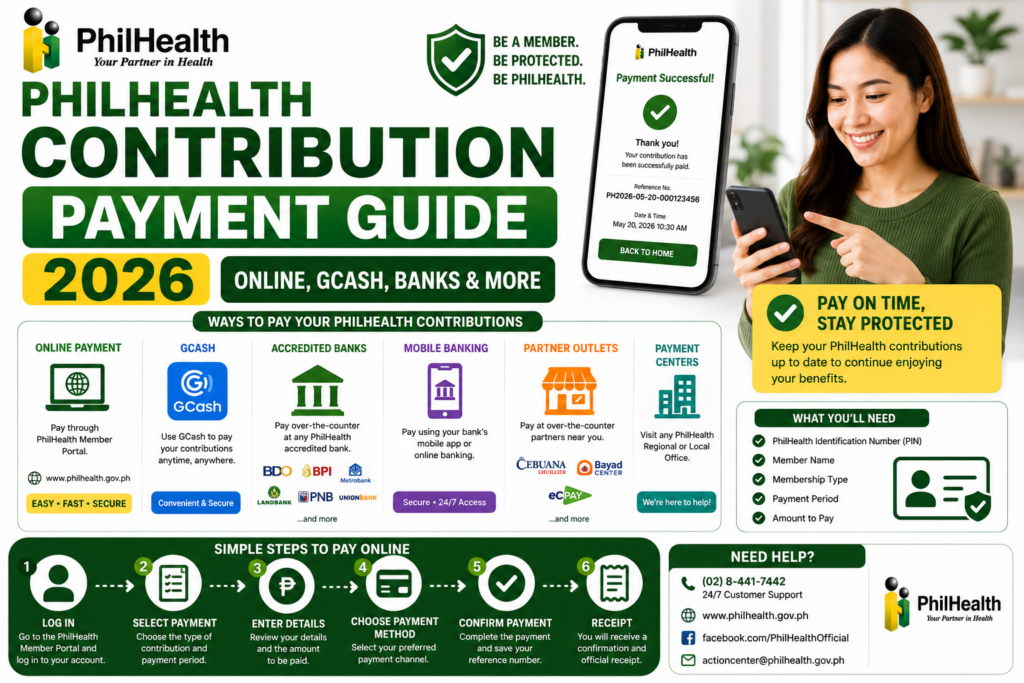
GCash is one of the most popular methods to pay PhilHealth contributions. Open your verified GCash account, tap “Bills,” select “Government,” and find “PhilHealth” in the biller list. Enter your 12-digit PhilHealth PIN, the contribution amount, your full name, and the coverage period. Review all details, confirm, and save the transaction receipt. For a complete walkthrough with screenshots, see our dedicated pay PhilHealth using GCash guide.
How to Pay PhilHealth Contributions Through Maya
Maya (formerly PayMaya) also offers PhilHealth as a biller under the Government category. The process is similar to GCash: open the Maya app, go to “Bills,” select “Government,” choose “PhilHealth,” and enter your payment details. Confirm the transaction and save the digital receipt. Maya payments typically post within 24-48 hours.
Paying PhilHealth Contributions Through Online Banking
Major Philippine banks with online banking platforms offer PhilHealth as a biller. Log into your bank’s app or website, navigate to “Bills Payment,” select “PhilHealth” as the biller, and enter your PIN and payment details. Posting through online banking may take 3-5 working days — slightly longer than digital wallets. Always keep the transaction confirmation until the payment appears in your contribution history.
Paying PhilHealth Contributions Through the Member Portal
The Member Portal offers the most integrated payment experience. Log in, navigate to the payment section, generate your Statement of Premium Account (SPA), and select “Pay Online.” The portal connects to integrated payment gateways. This method automatically links your payment to your SPA reference number, potentially reducing posting delays. It is the recommended method for self-employed and voluntary members who manage their own contributions.
Over-the-Counter PhilHealth Contribution Payment Methods
| Location | What to Bring | Posting Time |
|---|---|---|
| PhilHealth Branch | PIN, SPA or contribution amount, valid ID | Same day to 3 working days |
| Accredited Banks | PIN, SPA, payment form (if required) | 3-7 working days |
| Bayad Center / SM Bills Payment | PIN, contribution amount, coverage period | 3-7 working days |
Employer PhilHealth Contribution Payment Process
Employers handle contribution payments for their workforce. They deduct the employee’s share from salaries, add the employer’s counterpart, and remit the total to PhilHealth on a monthly schedule. As an employee, you should verify that remittances are actually made by regularly checking your contribution history through the Member Portal. A deduction on your payslip does not guarantee PhilHealth received the payment. For employer-specific guidance, see our PhilHealth Employers guide.
OFW PhilHealth Contribution Payment Options
OFWs can pay annual contributions through the Member Portal, GCash (if verified for international use), accredited Philippine banks with online banking, remittance partners abroad, or at Philippine embassies with PhilHealth services. Annual payment is the standard for OFWs. For complete OFW guidance, visit our PhilHealth OFW guide.
How to Generate a Statement of Premium Account Before Paying
A Statement of Premium Account (SPA) is your official billing document that shows the exact amount you need to pay. Generate it through the Member Portal by logging in, navigating to the payment section, and selecting your coverage period. The SPA displays your name, PIN, membership category, income bracket, premium rate, and total amount due. Use this document as your payment reference — it eliminates guesswork and reduces the risk of paying the wrong amount. For a detailed walkthrough, see our PhilHealth SPA guide.
How to Verify Your PhilHealth Contribution Payment Was Successful
- Save your payment receipt — screenshot or download the transaction confirmation.
- Wait for posting — online payments: 24-48 hours; over-the-counter: 3-7 working days.
- Log into the Member Portal and check “Contribution History.”
- Download your updated MDR to see the payment reflected in your membership record.
Payment Receipts and Proof of Payment
Always keep your payment receipt until the contribution is posted in your PhilHealth contribution history — and ideally longer. For digital payments, save the screenshot and email confirmation. For over-the-counter payments, keep the physical receipt. Your receipt contains the transaction reference number that both your payment provider and PhilHealth can use to trace the payment if posting issues arise. Organize receipts by date in a dedicated folder — physical or digital.
Common PhilHealth Contribution Payment Errors and Solutions
| Error | Likely Cause | Solution |
|---|---|---|
| “Biller Not Found” | PhilHealth temporarily unavailable on platform | Try again later; use alternative method |
| “Transaction Failed” | Poor connection or server timeout | Check internet; restart app; retry |
| Payment Deducted but Not Posted | Posting delay or transmission error | Wait posting period; contact provider; file PhilHealth inquiry |
Failed PhilHealth Contribution Payment Troubleshooting
Step 1: Check Your Internet Connection
Switch between WiFi and mobile data. Weak signals cause timeouts.
Step 2: Verify Account Balance
Ensure you have sufficient funds plus any applicable convenience fee.
Step 3: Restart the Payment App
Close completely and reopen to clear temporary glitches.
Step 4: Try a Different Payment Method
If one channel fails, use an alternative. Multiple channels exist for this reason.
Step 5: Contact Payment Provider Support
If funds were deducted but no confirmation received, contact GCash, Maya, or your bank immediately with the transaction reference if available.
Missing Contribution Records After Payment
If you paid but the contribution does not appear in your history after the expected posting window, do not pay again immediately. Gather your payment receipt, contact the payment provider to confirm the transaction status, and if confirmed successful, file an inquiry with PhilHealth through the Member Portal or at a branch with your receipt. Duplicate payments create reconciliation headaches. For detailed guidance, see our check PhilHealth contributions guide.
Payment Corrections and Adjustments
If you paid the wrong amount, paid for the wrong period, or paid to the wrong PIN, corrections are possible but require effort. Visit a PhilHealth branch with your payment receipt and explain the error. PhilHealth can adjust the posting if the payment has not yet been fully processed. For payments already posted incorrectly, a formal adjustment request is needed. Prevention is far easier than correction — always double-check details before confirming payment.
Security Tips for Online PhilHealth Contribution Payments
- Only use official apps — download GCash, Maya, and banking apps from official app stores.
- Verify the biller name is “PhilHealth” before confirming — scammers create similarly named fake billers.
- Never share your MPIN or banking passwords with anyone.
- Use a secure internet connection — avoid public WiFi for financial transactions.
- Log out after paying if using a shared or public device.
Expert Tips for Faster PhilHealth Payment Posting
- Pay through the Member Portal using the integrated gateway — SPA-linked payments often post fastest.
- Pay on weekdays during business hours — weekend and holiday payments process on the next working day.
- Use digital wallets (GCash/Maya) for faster posting compared to over-the-counter bank payments.
- Keep your receipt until posting is confirmed — never discard it prematurely.
- Pay a few days before your coverage deadline to allow for posting time.
PhilHealth Payment Methods Comparison Tables
Online vs Over-the-Counter Payment
| Feature | Online Payment | Over-the-Counter |
|---|---|---|
| Availability | 24/7 | Business hours only |
| Posting Speed | 24-48 hours | 3-7 working days |
| Receipt | Digital (instant) | Physical receipt |
Frequently Asked Questions About PhilHealth Contribution Payment
Can I pay my PhilHealth contribution using GCash?
Yes. GCash offers PhilHealth as a biller under the Government category. For a complete step-by-step walkthrough, see our dedicated GCash payment guide.
How do I know the correct amount to pay for PhilHealth?
Refer to the official PhilHealth Contribution Table or generate a Statement of Premium Account through the Member Portal, which calculates your exact amount due based on your membership category and declared income.
Can I pay multiple quarters of PhilHealth contributions at once?
Yes. You can pay for multiple quarters or a full year in a single transaction. Specify the full coverage period in your payment details. Annual payment is the most convenient option for voluntary and self-employed members.
What happens if I underpay my PhilHealth contribution?
Underpayment may result in your contributions being considered insufficient, potentially making your membership inactive. Always verify the correct amount before paying. If you discover an underpayment, pay the difference promptly.
Can employers pay PhilHealth contributions through GCash?
GCash is designed for individual member payments. Employers typically remit batch contributions through the PhilHealth Employer Portal, Electronic Premium Reporting System, or at PhilHealth branches and accredited banks with employer remittance forms.
Key Takeaways
- PhilHealth contribution payment can be made through multiple channels — online via the Member Portal, GCash, Maya, and online banking, or over-the-counter at branches, banks, and payment centers.
- Always generate an SPA before paying to ensure the correct amount, and keep your receipt until the payment is posted.
- Online payments post in 24-48 hours; over-the-counter payments take 3-7 working days.
- If a payment is deducted but not posted, do not pay again — contact the payment provider first, then file a PhilHealth inquiry with your receipt.
- Payment channels, contribution rates, and policies may change. Always verify through the official PhilHealth website at www.philhealth.gov.ph.
Image Recommendations for This Article
- Filename: philhealth-contribution-payment-methods-overview.jpg
ALT: Overview of PhilHealth contribution payment methods including GCash, Maya, online banking, and over-the-counter.
Title: PhilHealth Payment Methods
Caption: Choose from multiple PhilHealth contribution payment channels. - Filename: philhealth-spa-generation-before-payment.jpg
ALT: Screenshot of PhilHealth Member Portal showing Statement of Premium Account generation before payment.
Title: Generate SPA Before Payment
Caption: Generate your Statement of Premium Account to know the exact amount due. - Filename: philhealth-payment-receipt-confirmation.jpg
ALT: Digital payment receipt confirming successful PhilHealth contribution payment.
Title: Payment Confirmation Receipt
Caption: Always save your payment receipt until the contribution is posted.
Disclaimer
philhealth-portal.ph is an independent informational website and is not affiliated with the Philippine Health Insurance Corporation (PhilHealth) or the Philippine Government. Contribution rates, payment channels, collection partners, online services, and payment procedures may change over time. Always verify important information through official PhilHealth resources at www.philhealth.gov.ph.
Need More Help?
Explore our comprehensive PhilHealth Online Registration Guide for step-by-step instructions.
View Registration Guide →